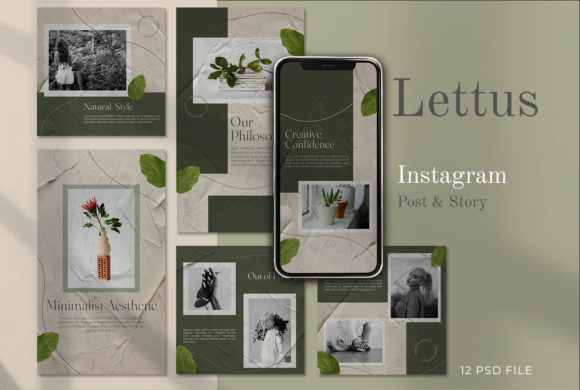
Evaluating the LETTUS Instagram Stories Post Template for Professional Social Media Design
In the rapidly evolving landscape of social media marketing, visual consistency is often the differentiator between a brand that appears established and one that seems transient. For businesses and content creators operating on tight schedules, the decision to build graphics from scratch versus utilizing pre-made assets is a critical strategic choice. The LETTUS - Instagram Stories Post template set represents a specific category of design resource: high-fidelity, editable PSD files intended for users who require professional output but may lack the time or specific design inclination to start with a blank canvas. Understanding where this tool fits within your workflow requires an honest assessment of its features, limitations, and how it compares to alternative design approaches.
Defining the Asset: Structure and Technical Specifications
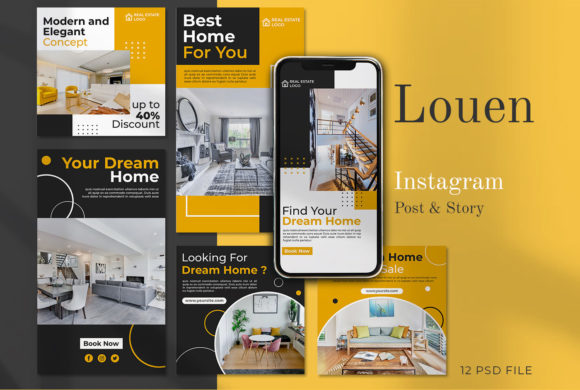
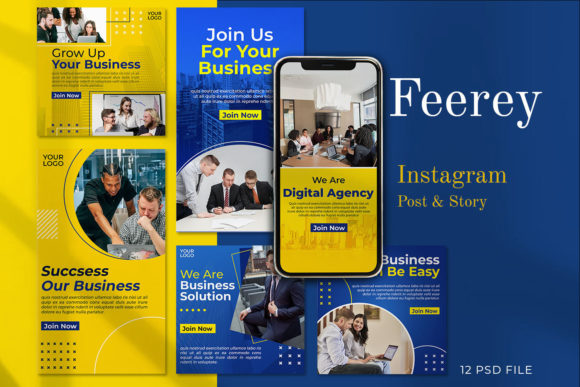
The LETTUS package is fundamentally a collection of 12 distinct variants designed for Instagram Stories and square posts. Unlike drag-and-drop web-based builders that restrict users to predefined layouts, this product provides access to the source files in Adobe Photoshop format (PSD). This distinction is vital for users who value granular control over their visual identity. The templates are constructed at 1080 x 1080 pixels for feed posts and 1920 x 1080 pixels for stories, ensuring they meet the native resolution requirements of major platforms without upscaling artifacts.
A key technical feature of the LETTUS set is its organization. The files utilize meticulously labeled layers and Smart Objects. For a user familiar with Photoshop, this structure significantly reduces friction. The "Smart Object" workflow allows for image replacement by simply double-clicking the layer icon, inserting the new photograph, saving, and watching the mockup update automatically. This method preserves the integrity of any filters, masks, or blending modes applied to the original design, a benefit that is often lost when manually placing images into flat designs. Furthermore, the files are set to 300 dpi in RGB color mode. While 72 dpi is standard for screen display, starting with a higher resolution provides a safety net if the assets ever need to be repurposed for print materials like flyers or brochures.
Comparative Analysis: PSD Templates vs. Drag-and-Drop Platforms
When evaluating the LETTUS templates, it is essential to compare them against the dominant alternative: browser-based design platforms. These online tools have gained massive popularity due to their low barrier to entry. They offer thousands of templates and require no software installation. However, the trade-off often lies in customization depth and ownership.
Browser-based tools typically operate on a subscription model and can limit export options or watermark designs unless a premium tier is purchased. In contrast, the LETTUS PSD files represent a one-time acquisition. Once downloaded, the user owns the working file indefinitely. There are no monthly fees, no reliance on an internet connection during the editing process, and no risk of a platform changing its pricing structure or shutting down.
From a design flexibility standpoint, PSD templates generally offer superior typographic control. Online builders often restrict users to a specific library of web fonts. With the LETTUS templates, since the text layers are fully editable using the Photoshop text tool, a designer can utilize any font installed on their local machine. This is crucial for brands with strict style guides that mandate specific proprietary or licensed typography. Additionally, layer effects such as drop shadows, glows, and complex blending modes are rendered natively in Photoshop, often resulting in a more polished, less "generic" look compared to the standardized effects found in mass-market online tools.
The Skill Requirement: A Critical Decision Factor
It is important to address the prerequisite skills associated with this product honestly. The LETTUS templates are not "no-code" or "no-skill" solutions. As noted in the product specifications, editing skills are needed, and the user must have Adobe Photoshop installed. This creates a clear dividing line in the target audience.
For a business owner who has never opened Photoshop, the learning curve to effectively use these templates could be steep. Tasks such as navigating the layers panel, understanding Smart Objects, and exporting for web optimization require a baseline level of digital literacy. If a user finds themselves struggling to locate the correct layer or accidentally flattening the image, the efficiency gains promised by the template may be negated by the time spent troubleshooting.
Conversely, for a social media manager, freelance designer, or a business owner with intermediate Photoshop knowledge, these templates act as a force multiplier. They eliminate the tedious setup phase—creating artboards, setting guides, choosing color palettes—and allow the professional to focus entirely on content strategy and image selection. In this context, the "cost" of the software requirement is outweighed by the speed and quality of the output.
Versatility and Use Cases
The inclusion of 12 variants within the LETTUS set addresses the need for variety without sacrificing brand cohesion. In social media management, posting the exact same layout repeatedly can lead to "banner blindness," where followers scroll past content because it looks too familiar. Having a set of coordinated but distinct layouts allows a brand to rotate styles while maintaining a recognizable aesthetic.
These templates are particularly well-suited for:
- Promotional Campaigns: The clean layouts provide ample space for product photography and clear call-to-action text.
- Announcements: The structured hierarchy ensures that key information (dates, times, locations) stands out immediately.
- Portfolio Showcases: Photographers and artists can use the Smart Object feature to quickly swap in high-resolution work without disrupting the frame.
However, there are limitations to consider. The templates are designed with a specific modern aesthetic. If a brand's identity relies heavily on hand-drawn illustrations, grunge textures, or highly experimental layouts that deviate from grid systems, these templates might feel too rigid or corporate. They excel in clarity and professionalism but may lack the whimsical or chaotic energy required for certain niche markets.
Making the Right Choice for Your Workflow
Deciding whether to invest in the LETTUS Instagram Stories Post templates comes down to an evaluation of your current resources and long-term goals. If your priority is speed above all else, and you have zero experience with image editing software, a cloud-based drag-and-drop service might initially seem more appealing despite the recurring costs.
However, if you value asset ownership, require precise control over typography and layer effects, and already possess (or are willing to learn) basic Photoshop skills, the LETTUS set offers a robust solution. The ability to edit every element means the templates can evolve with your brand. You are not locked into a static design; you can adjust colors to match seasonal campaigns or rearrange text blocks to suit different message lengths.
Furthermore, the quality of the source files matters. Poorly organized templates can become a nightmare to edit, with hidden layers and confusing naming conventions. The emphasis on "meticulously organized labeled layers" in the LETTUS description suggests a level of professional craftsmanship that respects the end-user's time. This organizational quality is often what separates a frustrating download from a valuable toolkit.
Ultimately, tools like LETTUS serve as a bridge between amateur experimentation and professional execution. They provide the structural foundation of a high-end design agency but leave the creative direction in the hands of the user. By understanding the technical requirements and comparing the benefits of local file editing against online convenience, businesses can make an informed decision that aligns with their operational capabilities and branding objectives.