Evaluating the LOUEN Instagram Stories Post Template for Professional Social Media Design
In the crowded landscape of social media marketing, visual consistency is often the differentiator between a brand that feels established and one that appears amateurish. For businesses and content creators operating on tight timelines, the decision to build graphics from scratch versus utilizing pre-made assets is a constant calculation of time versus quality. The LOUEN - Instagram Stories Post template set represents a specific category of design resource: high-fidelity, editable PSD files tailored for immediate deployment on platforms like Instagram. Understanding whether this tool fits your workflow requires a clear look at its technical specifications, its position relative to other design approaches, and the specific trade-offs involved in adopting a template-based strategy.
Defining the LOUEN Template Structure and Capabilities
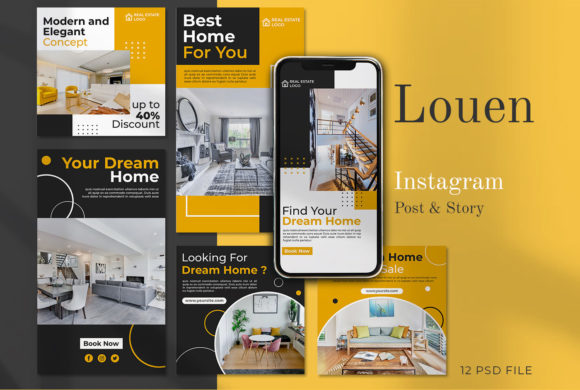
At its core, the LOUEN package is a collection of 12 distinct variants designed to cover a range of promotional needs. Unlike generic templates that might offer a single layout with swapped colors, this set provides structural variety while maintaining a cohesive aesthetic. The files are delivered in the PSD (Photoshop Document) format, which remains the industry standard for layer-based image editing. This choice of format is significant because it dictates the level of control a user has over the final output.
The technical foundation of these templates is built for high-resolution display. With dimensions of 1080 x 1080 pixels for square posts and 1920 x 1080 pixels for stories or landscape formats, the assets are optimized for retina displays and modern mobile screens. The inclusion of 300 DPI resolution ensures that should a business decide to repurpose these digital assets for print—such as flyers or event posters—the quality remains crisp without pixelation. Furthermore, the color mode is set to RGB, which is the correct spectrum for screen-based viewing, ensuring that colors appear vibrant on smartphones and monitors rather than muted as they might in CMYK print profiles.
A defining feature of the LOUEN set is its organization. In professional design workflows, a cluttered layer panel can double the time required to make edits. These templates utilize meticulously organized and labeled layers. This means that text elements, background shapes, image placeholders, and decorative overlays are separated logically. For a user, this translates to efficiency; you do not need to hunt through a "Group 45" to find the headline text. Instead, clear labeling allows for rapid identification and modification of specific components.
The Smart Object Workflow: Efficiency vs. Flexibility
The mechanism that drives the usability of the LOUEN templates is the Smart Object feature. For those unfamiliar with advanced Photoshop functions, a Smart Object acts as a container for an image file. In the context of these templates, the process is streamlined: the user double-clicks the layer icon within the image group, places their own photograph into the new window, saves it, and the main design updates automatically.
This approach offers a distinct advantage over manual masking or clipping paths found in less sophisticated templates. It preserves the original image data and applies transformations non-destructively. However, it also introduces a specific requirement: the user must have Adobe Photoshop installed. This is a critical decision factor. While online tools like Canva or browser-based editors offer drag-and-drop simplicity, they often lack the granular control and high-end finishing effects (such as complex blending modes or precise shadowing) that a native PSD file can deliver. If your team relies entirely on web-based apps, the LOUEN templates would require a shift in software infrastructure.
Comparing Template-Based Design to Alternative Approaches
When evaluating the LOUEN Instagram Stories Post set, it is helpful to compare it against three common alternatives: custom design from scratch, subscription-based online builders, and free generic templates.
Custom Design from Scratch: Hiring a designer or building every post manually offers unlimited creative freedom but comes with high costs in terms of time and money. A single custom graphic can take hours to conceptualize and execute. The LOUEN templates serve as a middle ground, providing a professional starting point that eliminates the blank canvas paralysis while still allowing for full customization of text and imagery. They are ideal for businesses that need daily content but cannot afford a dedicated designer for every post.
Subscription-Based Online Builders: Platforms offering drag-and-drop interfaces are popular for their ease of use. However, they often suffer from "template fatigue," where thousands of users utilize the same assets, making brands look identical. Additionally, exporting from these platforms sometimes results in compressed images that lose quality upon upload to Instagram. The LOUEN PSD files, being local assets with 300 DPI source files, ensure that the output quality is entirely dependent on your export settings, giving you superior control over the final file size and clarity.
Free Generic Templates: While cost-effective, free resources often lack the organizational discipline of premium sets. Layers may be merged, fonts might be missing, or the resolution may be insufficient for high-density screens. The LOUEN set addresses these pain points by offering well-labeled layers and ensuring all text is fully editable with standard text tools, provided the necessary fonts are available or substituted.
Ideal Use Cases and Strategic Fit
The LOUEN templates are particularly well-suited for small to medium-sized businesses, e-commerce stores, and personal brands that prioritize visual polish. Because the set includes 12 variants, it supports a content calendar that requires variety without sacrificing brand identity. For example, a retail store could use one variant for product spotlights, another for customer testimonials, and a third for flash sale announcements, all while maintaining a consistent font hierarchy and color palette.
These templates are also advantageous for marketing agencies managing multiple client accounts. The ability to quickly swap images via Smart Objects allows a social media manager to produce a week's worth of content in a fraction of the time it would take to design each post individually. The "editable elements" feature ensures that agency teams can adapt the tone of the copy to match different client voices without breaking the design layout.
Limitations and Considerations for Adoption
Despite their strengths, there are limitations to consider before purchasing. The primary constraint is the software requirement. As noted, editing skill and access to Photoshop are mandatory. There is a learning curve associated with navigating Smart Objects and understanding layer structures for beginners. If your team consists entirely of non-designers who have never opened Photoshop, the initial investment in training or the friction of adoption might outweigh the benefits of the template's quality.
Additionally, it is important to note that the preview images showcased in promotional materials for the LOUEN set are not included in the download. Users must source their own photography. This is a standard practice in the industry but serves as a reminder that the template is only as good as the assets you put into it. High-quality templates can sometimes expose low-quality photography, so businesses must ensure they have a library of professional-grade images ready to deploy.
Making an Informed Decision
Choosing the right design resource ultimately depends on your current workflow and future goals. If you value high-resolution output, need complete control over every pixel, and already operate within the Adobe ecosystem, the LOUEN - Instagram Stories Post template set offers a robust solution. It bridges the gap between the speed of automated tools and the quality of bespoke design.
However, if your priority is zero-learning-curve simplicity or if you strictly work within a browser environment, other alternatives may serve you better. The trade-off here is clear: you exchange the absolute ease of drag-and-drop web tools for the superior fidelity and flexibility of native Photoshop files. For brands aiming to elevate their Instagram presence from "functional" to "brilliant," investing in a well-organized, versatile template system like LOUEN can be a strategic move that pays dividends in engagement and perceived professionalism.